Display & Layouts:Compasses
Compass widgets can display a dynamically updating compass rose
that shows available exits from the current room.
Demo Game
// CompassWidget.js
/* global AdventureJS A Game */

var CompassWidget = new AdventureJS.Game(
  "CompassWidget",
  "CompassWidgetContainer"
);

// --------------------------------------------------
// Settings
// --------------------------------------------------

CompassWidget.settings.set({
  display: "inline",
  title: "Compass Widget",
  author: "Ivan Cockrum",
  description:
    "Here is an example of a simple layout with a fixed compass widget that always shows active exits. ",
  version: "0.0.1",
});

// --------------------------------------------------
// Widgets
// --------------------------------------------------

// Create the widget.
CompassWidget.createWidget({
  class: "Compass",
  id: "MyCompassWidget",
  format: "map",
  cssclasses: ["custom", "compass"],
  region: "left",
});

// --------------------------------------------------
// Player
// --------------------------------------------------

CompassWidget.createAsset({
  class: "Player",
  name: "Explorer",
  place: { in: "Start Room" },
});

// --------------------------------------------------
// Rooms
// --------------------------------------------------

CompassWidget.createAsset({
  class: "Room",
  name: "Start Room",
  description: `
    This is the Start Room.
  `,
  exits: {
    east: "East Room",
    west: "West Room",
    north: "North Room",
    south: "South Room",
  },
});

CompassWidget.createAsset({
  class: "Room",
  name: "North Room",
  description: `This is the North Room. `,
  exits: {
    northwest: "Northwest Room",
    northeast: "Northeast Room",
    south: "Start Room",
  },
});

CompassWidget.createAsset({
  class: "Room",
  name: "South Room",
  description: `This is the South Room. `,
  exits: {
    north: "Start Room",
    southwest: "Southwest Room",
    southeast: "Southeast Room",
  },
});

CompassWidget.createAsset({
  class: "Room",
  name: "East Room",
  description: `This is the East Room. `,
  exits: {
    west: "Start Room",
    in: "In Room",
  },
});

CompassWidget.createAsset({
  class: "Room",
  name: "West Room",
  description: `This is the West Room. `,
  exits: {
    east: "Start Room",
    out: "Out Room",
  },
});

CompassWidget.createAsset({
  class: "Room",
  name: "Northwest Room",
  description: `This is the Northwest Room. `,
  exits: {
    southeast: "North Room",
  },
});

CompassWidget.createAsset({
  class: "Room",
  name: "Northeast Room",
  description: `This is the Northeast Room. `,
  exits: {
    southwest: "North Room",
  },
});

CompassWidget.createAsset({
  class: "Room",
  name: "Southwest Room",
  description: `This is the Southwest Room. `,
  exits: {
    northeast: "South Room",
    down: "Down Room",
  },
});

CompassWidget.createAsset({
  class: "Room",
  name: "Southeast Room",
  description: `This is the Southeast Room. `,
  exits: {
    northwest: "South Room",
    up: "Up Room",
  },
});

CompassWidget.createAsset({
  class: "Room",
  name: "In Room",
  description: `This is the In Room. `,
  exits: {
    out: "East Room",
  },
});

CompassWidget.createAsset({
  class: "Room",
  name: "Out Room",
  description: `This is the Out Room. `,
  exits: {
    in: "West Room",
  },
});

CompassWidget.createAsset({
  class: "Room",
  name: "Down Room",
  description: `This is the Down Room. `,
  exits: {
    up: "Southwest Room",
  },
});

CompassWidget.createAsset({
  class: "Room",
  name: "Up Room",
  description: `This is the Up Room. `,
  exits: {
    down: "Southeast Room",
  },
});

// --------------------------------------------------
// Objects
// --------------------------------------------------

CompassWidget.createAsset({
  class: "Pencil",
  name: "indigo pencil",
  a: "an",
  adjectives: "indigo, colored",
  place: { in: "Start Room" },
  description: "It's an indigo colored pencil. ",
});

CompassWidget.createAsset({
  class: "Pencil",
  name: "violet pencil",
  article: "a",
  adjectives: "violet, colored",
  place: { in: "Start Room" },
  description: "It's a violet colored pencil. ",
});

CompassWidget.createAsset({
  class: "Entity",
  name: "paint brush",
  article: "a",
  // adjectives: "",
  place: { in: "Start Room" },
  description: "It's a number 12 paint brush. ",
});

CompassWidget.createAsset({
  class: "Pencil",
  name: "yellow pencil",
  article: "a",
  adjectives: "yellow, colored",
  place: { in: "Start Room" },
  description: "It's a yellow colored pencil. ",
});

CompassWidget.createAsset({
  class: "Pencil",
  name: "blue pencil",
  article: "a",
  adjectives: "blue, colored",
  place: { in: "North Room" },
  description: "It's a colored pencil, zinc blue. ",
});

CompassWidget.createAsset({
  class: "Crayon",
  name: "pink crayon",
  article: "a",
  adjectives: "pink, colored",
  place: { in: "North Room" },
  description: "It's a pink crayon. ",
});

CompassWidget.createAsset({
  class: "Pencil",
  name: "red pencil",
  article: "a",
  adjectives: "red, colored",
  place: { in: "South Room" },
  description: "It's a red colored pencil. ",
});

CompassWidget.createAsset({
  class: "Crayon",
  name: "white crayon",
  article: "a",
  adjectives: "white, colored",
  place: { in: "South Room" },
  description: "It's a white crayon. ",
});

CompassWidget.createAsset({
  class: "Pencil",
  name: "orange pencil",
  // article: "a",
  adjectives: "orange, colored",
  place: { in: "East Room" },
  description: "It's an orange colored pencil. ",
});

CompassWidget.createAsset({
  class: "Crayon",
  name: "maroon crayon",
  article: "a",
  adjectives: "maroon, colored",
  place: { in: "East Room" },
  description: "It's a maroon crayon. ",
});

CompassWidget.createAsset({
  class: "Pencil",
  name: "green pencil",
  article: "a",
  adjectives: "green, colored",
  place: { in: "West Room" },
  description: "It's a green colored pencil. ",
});

CompassWidget.createAsset({
  class: "Crayon",
  name: "plum crayon",
  article: "a",
  adjectives: "plum, colored",
  place: { in: "West Room" },
  description: "It's a plum crayon. ",
});
Demo Source files
Right-click and choose "Save as..." to download source files.
Notes:
- Demo games are set to a small size to fit doc pages. They can easily be enlarged via display settings.
- Demo games all use the same theme. Colors and fonts can be changed via custom CSS.
- Demo games don't include the core AdventureJS code. To run downloaded games locally, you'll need to also download copies of the core JS and CSS and set up this local folder structure.
AdventureJS
└── js
|   └── adventure.js
└── css
|   └── adventurejs.css
└── games
    ├── demogame01
    ├── demogame02
    └── demogame03
Example Code
Compass widgets can display a compass that dynamically updates to show available exits. A mini-compass is shown in the statusbar by default. Adding a compass widget automatically disables the statusbar's mini-compass.
MyGame.createWidget({
  class: "Compass",
  id: "MyCompass",
  cssclasses: ["custom", "compass"],
  format: "rose1"
  region: "left"
});
Compass Widget Formats
A number of built-in compass designs are available for authors to choose from. By default, AdventureJS will use one of its built-in compasses, but you can build your own compass in HTML if you prefer.
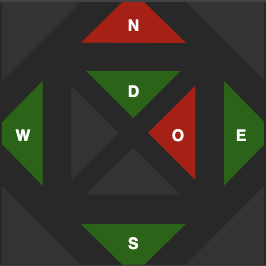
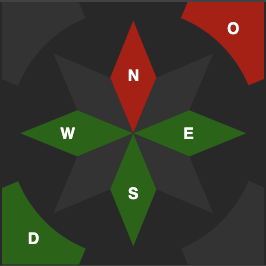
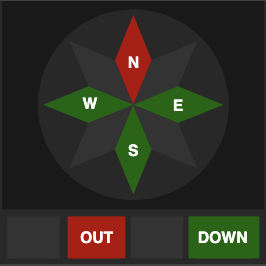
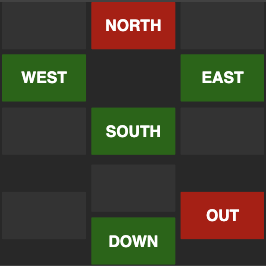
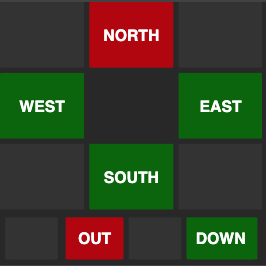
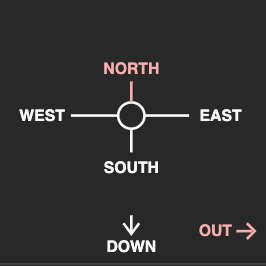
Here's the minimum HTML you need to define a custom compass. The important parts are:
-
There must be a top level container that has the id passed through
createWidget(). - There must be an element with class
ajs-compass. -
Compass directions can be buttons or any other HTML tag. Regardless of type,
they must have two classes:
.ajs-compass-direction, and the button's direction.
If you're building your own HTML, you'll also need to handle your own CSS, as the built-in compass CSS won't apply to your custom HTML.
  <div id="MyCompassContainer">
    <div class="ajs-compass">
      <button
        class="north ajs-compass-direction">NORTH
      </button>
      <button
        class="south ajs-compass-direction">SOUTH
      </button>
      <button
        class="east ajs-compass-direction">EAST
      </button>
      <button
        class="west ajs-compass-direction">WEST
      </button>
      // (and any other directions you want)
    </div>
  </div>
Compass Widget Properties
- id {String} The ID to be given to the widget. If an HTML element with this ID already exists on the page, that element will be used. Otherwise an element with this ID will be created at game initialization.
- cssclasses {Array} Optional custom CSS classes to apply to the widget.
-
style
{String}
The built-in compass style to apply. Valid options are:
rockrose1rose2grid1grid2map
rockwill be used. -
region
{String}
The region to place the compass in. Valid options are:
topleftrightbottom