Devlog:Layouts & Docks
September 4, 2026
Since the beginning, AdventureJS has run in a 600x480 window. It's the size of the examples in the documentation. Admittedly, it's tiny. Most other parser systems I've seen tend to go full window. Personally, I find that to be an unsatisfactory UI choice, but I get that it's what a lot of people expect. It's always been fairly easy to adjust a game's layout through CSS, but I'd never gotten around to codifying it until now. I have settled on a set of styles called box, page, and full, each with a set of default sizes.
- xs box
- the original, 600px wide x 480px high
- small box
- 768px wide x 600px high
- medium box
- 960px wide x 680px high
- large box
- 1024px wide x 768px high
- xl box
- 1200px wide x 1024px high
- xs page
- 600px wide x 100% high
- small page
- 768px wide x 100% high
- medium page
- 960px wide x 100% high
- large page
- 1024px wide x 100% high
- xl page
- 1024px wide x 100% high
- full
- 100% wide x 100% high (aka full window)
I believe this offers some basic options to authors who don't want to jump into custom CSS right away, while authors who are familiar with CSS should be able to modify the layout as they like.
Related to layouts, widgets are a concept I added back around October 2025, but which I had never gotten around to properly documenting. Widgets are plug & play layout extensions that let authors add things like a room description or a room image or a list of inventory items – all the features that made Legend games look like Legend games. (I know that other players may have different points of reference depending on which side of the Atlantic they grew up in.)
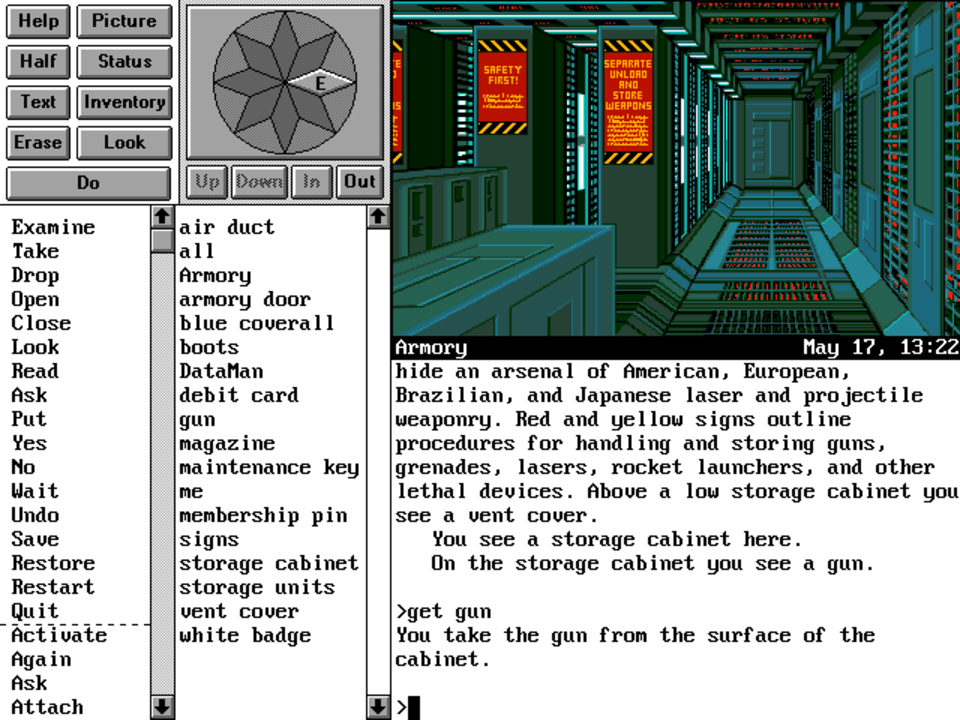
On reviewing the work done last year, I found a number of improvements and consistencies waiting to be made. A chief improvement was formalizing a grid layout that allows widgets to be plugged into the display and have it automatically adjust to them. The result of all this busywork is a whole new chapter for Layout & Graphics in the manual.